 Español
  Français
  Deutsch
  Italiano
  Nederlands
  Português
  Русский
  中文
中文  日本語
日本語  العربية
  Türkçe

 English

 Bangui, Central African Republic
Scan a QR code for immediate connectivity to our high-speed data network via an eSIM-compatible device anywhere and anytime at competitive rates, ensuring reliability and superior customer service.
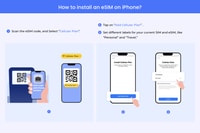
Our e-SIM service offers seamless connectivity through an automated installation process facilitated by a QR code, ensuring effortless access to various networks worldwide. Available in multiple data volumes, validity periods, and coverage options tailored to specific regions, this solution caters to users seeking uninterrupted communication across diverse geographical locations.
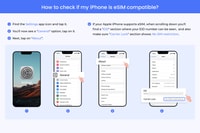
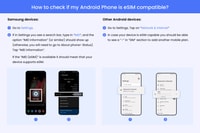
Compatible with most iPhone models beyond the XS generation, including those running iOS versions up to 14, the e-SIM system includes a comprehensive list of supported devices alongside detailed guidance on how to verify compatibility. For additional convenience, share the QR code via AirDrop or manually scan it onto another compatible device.
To activate the e-SIM, connect your device to either WiFi or a cellular network. Ensure that the feature enabling roaming is enabled within your settings menu. Should issues arise during connection, refer to our troubleshooting resources for assistance.
For travelers heading to Africa, especially those visiting 29 designated countries, such as Reunion, Madagascar, Malawi, and others, opt for the Africa-specific configuration available in our service interface. This choice will cover key destinations including Reunion, Madagascar, Malawi, Botswana, Burkina Faso, Central African Republic, Chad, Congo, Congo-DRC, Côte d’Ivoire, Egypt, Gabon, Ghana, Guinea-Bissau, Kenya, Liberia, Mali, Morocco, Niger, Nigeria, Senegal, Seychelles, South Africa, Sudan, Swaziland, Tanzania, Tunisia, Uganda, Zambia.
In case of insufficient data usage, renew your subscription by purchasing an additional e-SIM card, allowing you to easily replenish your account balance. To set up the APN (Access Point Name) for Orange's local network, enter "iboots" followed by the domain name "orange.co.uk".
 Book
Book
| Highlights | Strengthen connectivity during travel by scanning the QR code for the e-SIM installation. Enjoy high-speed LTE/5G networks anytime and anywhere. Access disposable data plans at will and without generating any physical disposals. |
|---|---|
| Includes | The LTE/5G network offers robust coverage with superior speed. Additionally, the system includes hotspot functionality for seamless connectivity. In case of accidental deletion of an eSIM, the device will automatically reinstall it. Customer service is available via email for inquiries or issues related to the product. Voice communication and SMS messaging services are supported. |

Free cancellation
For cancellations made up to two days prior, a full refund will be provided.

Reserve now & pay later
Maintain your travel arrangements as adaptable as possible; make reservations and settle payments immediately.

Valid 7 - 30 days
Please verify the availability to ascertain the commencement times.
From
16€Per Person
Maintain your travel arrangements as adaptable as possible; make reservations and settle payments immediately.
 Give as a gift
Bangui, Central African Republic  See on map
The e-SIM service provides seamless connectivity to high-speed data networks via an eSIM-compatible device.
Yes, the e-SIM service is compatible with most iPhone models beyond the XS generation, including those running iOS versions up to 14.
The e-SIM service ensures reliable and superior customer service by providing instantaneous connectivity to our high-speed data network via an eSIM-compatible device.
Yes, we offer several configurations based on user needs, including global and regional plans.
The validity period depends on the plan chosen, but typically ranges from one month to six months.
Yes, you can purchase an additional e-SIM card to easily replenish your account balance and continue enjoying the benefits of our service.
Yes, we have a dedicated troubleshooting resource available to assist users with any issues they may encounter while connecting their device to the e-SIM service.
Ensure that the feature enabling roaming is enabled within your settings menu before attempting to connect your device to the e-SIM service.
Connect your device to either WiFi or a cellular network and follow the instructions provided by the manufacturer.
You can share the QR code via AirDrop or manually scan it onto another compatible device.
Once connected to a network, log into your account and proceed to the e-SIM activation page to complete the setup.
Yes, ensure that the feature enabling roaming is enabled within your settings menu before attempting to connect your device to the e-SIM service.
We offer specific e-SIM configurations for travelers going to Africa, including destinations like Reunion, Madagascar, Malawi, and more.
Renew your subscription by purchasing an additional e-SIM card, which allows you to easily replenish your account balance and continue enjoying the benefits of our service.
Enter 'iboots' followed by the domain name 'orange.co.uk' when setting up the APN for Orange's local network.

Subscribe to our newsletter and get the best offers!
By entering your email address, you consent to receive automatically generated personalized commercial proposals, including proposals and offers of products and services from us and selected third parties (your data will not be shared with them). For more information or to revoke your consent, please refer to our Privacy Policy (you can also unsubscribe by clicking on the link in the email).